



Outline
- Introduction
- What Is WeVideo.com?
- Why WeVideo Stands Out in the Digital Learning Landscape
- Core Functionalities and Educational Impact
- WeVideo for Business and Corporate Learning
- Integration and Compatibility
- Alternatives to WeVideo
- Real-World Use Cases and Success Stories
- Conclusion
Introduction
In today’s digital-first world, video has become a cornerstone of communication, education, and marketing. Platforms like WeVideo.com are redefining how individuals and organizations create, share, and interact with multimedia content. Whether you are an educator seeking to engage students through interactive lessons or a business professional aiming to enhance learning and development programs, WeVideo provides a comprehensive, cloud-based solution that simplifies video creation while maximizing engagement and collaboration.
What Is WeVideo.com?
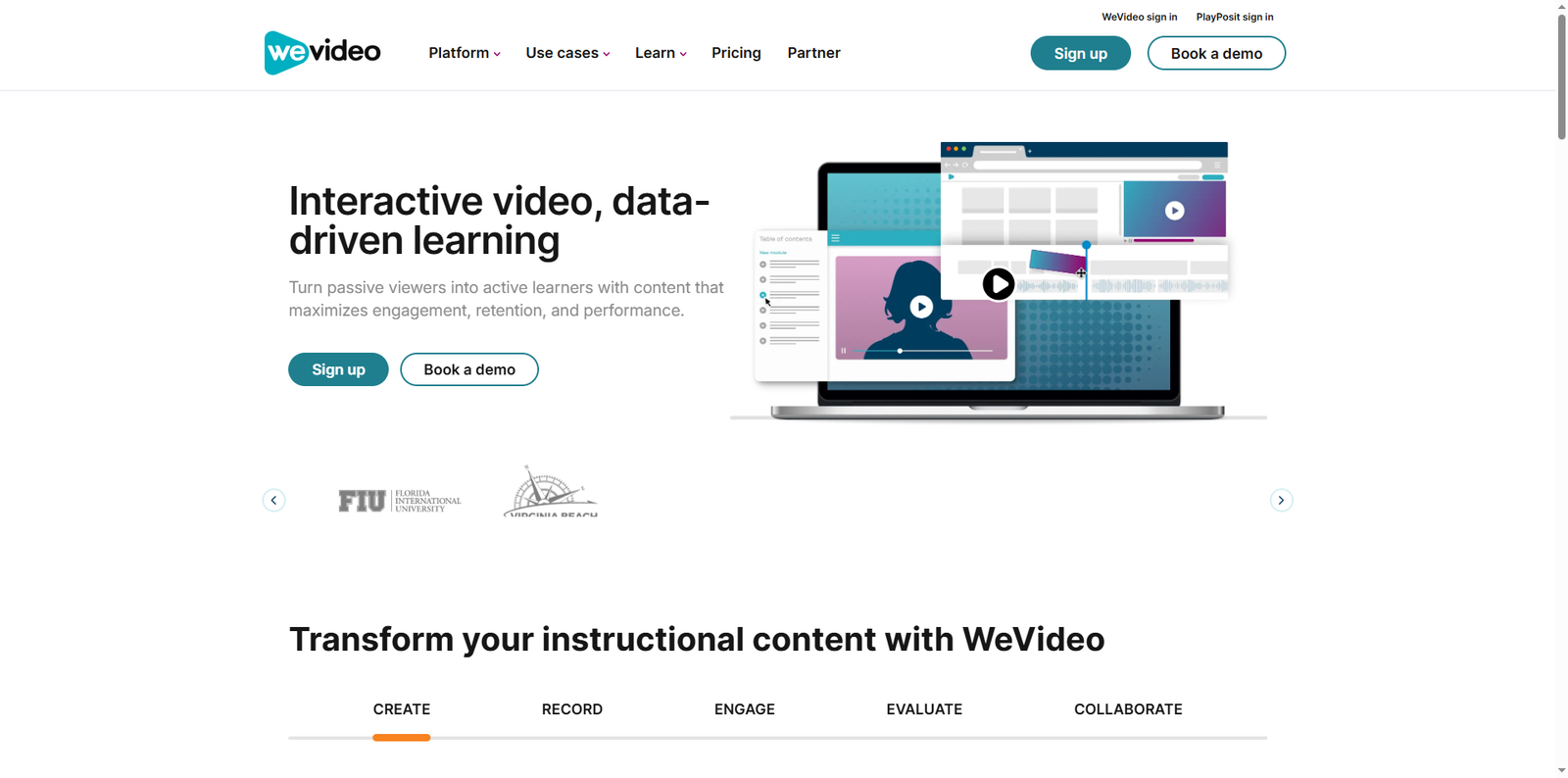
WeVideo is a cloud-based multimedia creation platform designed to make video editing and interactive content accessible to everyone. Founded in 2011 and headquartered in Mountain View, California, WeVideo has grown into a trusted tool used by millions of educators, students, and businesses worldwide. The platform allows users to create videos, podcasts, GIFs, and other multimedia projects directly from their web browser, eliminating the need for complex software installations or high-end hardware.
Cloud-Based Accessibility
Because WeVideo operates entirely online, users can access their projects from any device with an internet connection. This flexibility is particularly valuable for schools and organizations with distributed teams or remote learners. Projects are stored securely in the cloud, enabling real-time collaboration and easy sharing.
Why WeVideo Stands Out in the Digital Learning Landscape
WeVideo’s unique approach to interactive video creation distinguishes it from traditional video editing tools. It is not merely a platform for cutting and merging clips—it’s an ecosystem that supports engagement, analytics, and learning outcomes. According to WeVideo’s official data, two-thirds of the top 100 U.S. school districts use its tools to enhance classroom instruction and digital literacy.
Interactive Video for Active Learning
WeVideo’s interactive video capabilities allow educators to embed polls, quizzes, and free-response questions directly into videos. This transforms passive viewing into active participation, helping learners retain information more effectively. Teachers can track responses and performance data in real time, enabling personalized feedback and adaptive instruction.
Data-Driven Insights
Through real-time analytics, educators and administrators can monitor how students engage with content. Metrics such as completion rates, interaction frequency, and response accuracy provide valuable insights into learner behavior. These analytics help instructors refine their teaching strategies and identify areas where students may need additional support.
Core Functionalities and Educational Impact
WeVideo empowers educators to integrate multimedia creation into their teaching practices, fostering creativity and critical thinking among students. The platform supports project-based learning (PBL), where students collaborate on video projects that demonstrate understanding of key concepts. This approach aligns with 21st-century learning goals, emphasizing communication, collaboration, and digital literacy.
Screen and Web Recording
Teachers and students can record their screens, webcams, or both simultaneously. This feature is ideal for creating tutorials, presentations, and flipped classroom content. The auto-sync functionality ensures that video and voiceover remain perfectly aligned, saving time during editing.
Collaboration and Sharing
WeVideo’s collaborative environment allows multiple users to work on the same project in real time. Educators can co-design lessons, and students can contribute to group assignments, even from different locations. Finished videos can be shared directly through learning management systems (LMS) or published to platforms like YouTube and Google Drive.
WeVideo for Business and Corporate Learning
Beyond education, WeVideo is a powerful tool for businesses seeking to enhance internal communication and training. Organizations use it to create onboarding materials, marketing videos, and customer engagement content. The platform’s intuitive interface allows employees with little to no editing experience to produce professional-quality videos quickly.
Learning and Development (L&D)
Corporate trainers can design interactive learning modules that include embedded assessments and feedback loops. This approach not only improves knowledge retention but also provides measurable data on employee performance. Businesses can use these insights to refine training programs and ensure alignment with organizational goals.
Marketing and Customer Engagement
Marketing teams leverage WeVideo’s multimedia tools to produce compelling storytelling content that resonates with audiences. The ability to add interactive layers—such as clickable links or product highlights—makes videos more engaging and actionable, driving higher conversion rates.
Integration and Compatibility
WeVideo integrates seamlessly with popular educational and business platforms, streamlining workflows and enhancing productivity. It connects with learning management systems like Canvas, Schoology, and Google Classroom, allowing educators to embed videos directly into their courses. For businesses, integration with Google Workspace and Microsoft Teams simplifies content sharing and collaboration.
| Integration | Purpose |
|---|---|
| Canvas | Embed interactive videos into course modules |
| Google Classroom | Assign and review student video projects |
| Microsoft Teams | Collaborate on corporate training videos |
| Schoology | Streamline multimedia lesson delivery |
Alternatives to WeVideo
While WeVideo offers a robust suite of tools, users may also explore other platforms that cater to specific needs or preferences. Here are some notable alternatives:
- Clipchamp – A browser-based video editor by Microsoft, ideal for quick social media content creation.
- Adobe Express – Offers simplified video editing and design tools for educators and marketers.
- Canva – Known for its intuitive interface and multimedia templates, suitable for creating educational videos and presentations.
- Kapwing – A collaborative online editor that supports real-time teamwork and creative flexibility.
Real-World Use Cases and Success Stories
WeVideo’s impact is evident across educational institutions and organizations worldwide. For example, districts such as the San Francisco Unified School District have integrated WeVideo into their digital literacy programs, enabling students to produce documentaries and multimedia reports. In higher education, universities use WeVideo to support online course development and faculty training initiatives.
In the corporate sector, companies leverage WeVideo to streamline internal communications and enhance brand storytelling. Marketing departments use it to produce customer testimonials and promotional videos, while HR teams create engaging onboarding materials that reflect company culture. The platform’s scalability ensures it can support both small teams and large enterprises.
Conclusion
WeVideo.com stands at the intersection of creativity, technology, and education. Its cloud-based platform empowers users to produce professional-quality multimedia content without technical barriers. By combining interactive video, real-time analytics, and seamless integrations, WeVideo transforms how educators teach, students learn, and businesses communicate. Whether you’re looking to inspire learners, engage customers, or tell your story through video, WeVideo provides the tools and flexibility to make it happen. As digital storytelling continues to shape the way we share knowledge and ideas, WeVideo remains a trusted partner in driving innovation and engagement across industries.