


Outline
- Introduction to Pixlr.com
- What Makes Pixlr Unique?
- Exploring Pixlr’s AI-Powered Tools
- Pixlr E and Pixlr X: Two Editing Experiences
- Pixlr’s AI Video Generator
- How Pixlr Enhances Creative Workflows
- Alternatives to Pixlr
- Tips for Getting the Most Out of Pixlr
- Conclusion
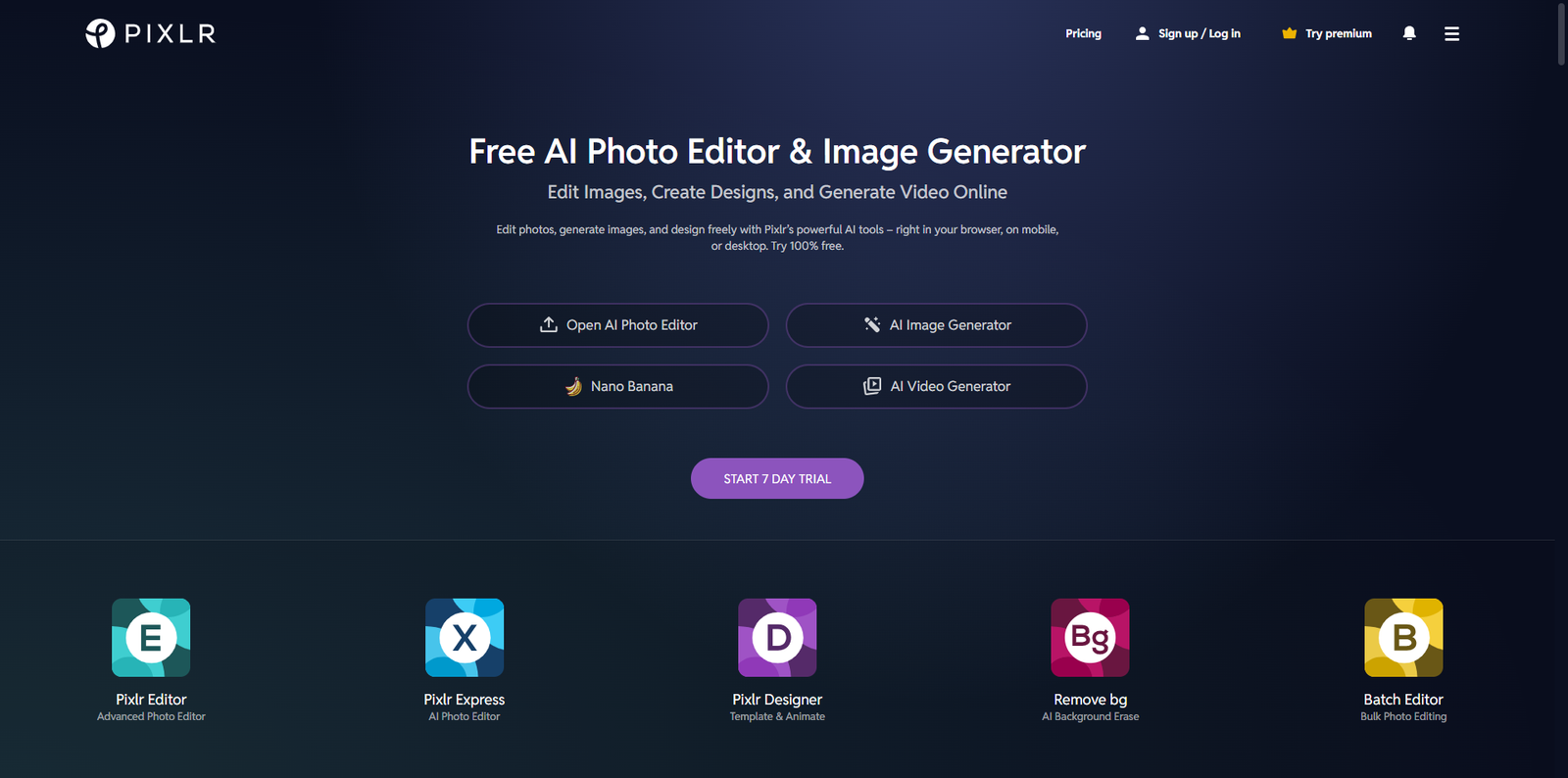
In the fast-evolving world of digital creativity, Pixlr.com stands out as a versatile and accessible online editing platform. Founded in 2008 by Ola Sevandersson, Pixlr quickly gained popularity for offering professional-grade editing tools directly in the browser. Today, it serves millions of users worldwide, from graphic designers and photographers to marketers and students, providing a seamless experience for editing photos, creating designs, and now generating AI-powered videos.
Pixlr’s mission is simple: to make creative tools accessible to everyone, regardless of skill level. With its cloud-based infrastructure, users can edit images and videos from any device without installing heavy software. This flexibility has positioned Pixlr as one of the most popular online editing tools globally, with over 500 million total users according to industry reports.
What Makes Pixlr Unique?
Pixlr’s uniqueness lies in its combination of simplicity, power, and innovation. It bridges the gap between professional editing software and beginner-friendly tools, offering an intuitive interface that still supports advanced editing capabilities. The platform’s AI-driven features automate complex tasks such as background removal, object selection, and image enhancement, saving users significant time.
Another defining feature is Pixlr’s accessibility. Since it operates entirely in the browser, users can start editing instantly without downloads or installations. This makes it ideal for quick edits, social media content creation, and collaborative projects. Furthermore, Pixlr supports a wide range of file formats, including PSD, PNG, JPEG, and WebP, ensuring compatibility with other popular design tools.
Exploring Pixlr’s AI-Powered Tools
Pixlr has embraced artificial intelligence to redefine how users create and edit visual content. Its AI suite includes tools that automate repetitive tasks and enhance creative possibilities.
AI Background Remover
One of Pixlr’s most popular features is its AI background remover, which instantly isolates subjects from their backgrounds with remarkable accuracy. This tool is particularly useful for e-commerce product photos, profile pictures, and marketing materials.
AI Image Generator
Pixlr’s AI Image Generator allows users to create stunning visuals from text prompts. By leveraging advanced generative AI models, users can produce unique images for social media, advertising, or creative projects without needing design expertise.
AI Face Swap
The AI Face Swap tool enables users to swap faces between images seamlessly. This feature is gaining popularity among content creators and marketers who want to personalize visuals or create engaging digital content.
Pixlr E and Pixlr X: Two Editing Experiences
Pixlr offers two main editing interfaces—Pixlr E and Pixlr X—each designed for different user needs.
Pixlr E: Advanced Editing for Professionals
Pixlr E is tailored for users who require more control and precision. It includes advanced tools for layer editing, masking, and retouching. The interface resembles traditional desktop software, making it ideal for designers familiar with programs like Adobe Photoshop.
Pixlr X: Quick and Easy Editing
Pixlr X, on the other hand, focuses on simplicity and speed. It’s perfect for beginners or those who need to create quick edits, social media posts, or marketing visuals. The drag-and-drop interface and pre-designed templates make it easy to produce professional results in minutes.
| Feature | Pixlr E | Pixlr X |
|---|---|---|
| Editing Complexity | Advanced | Basic to Intermediate |
| Interface Style | Professional Layout | User-Friendly Dashboard |
| Best For | Designers, Photographers | Social Media Managers, Beginners |
Pixlr’s AI Video Generator
One of Pixlr’s latest innovations is its AI Video Generator, which transforms text and images into dynamic videos. This tool is revolutionizing how users create video content by automating the production process. Users can simply upload images or input text prompts, and Pixlr’s AI will generate high-quality videos suitable for social media, advertising, and presentations.
The AI Video Generator supports both image-to-video and text-to-video conversions, offering flexibility for different creative needs. It’s particularly beneficial for marketers who need to produce engaging content quickly without investing in complex video editing software.
How Pixlr Enhances Creative Workflows
Pixlr’s integration of AI and cloud-based technology streamlines creative workflows across industries. For businesses, it simplifies content creation by reducing the need for multiple software tools. Teams can collaborate online, share files instantly, and maintain consistent branding across projects.
For individual creators, Pixlr offers a space to experiment with design ideas without technical barriers. The platform’s templates, overlays, and filters encourage creativity while maintaining professional quality. Moreover, Pixlr’s compatibility with cloud storage services ensures that projects remain accessible and secure.
Use Cases Across Industries
- Marketing and Advertising: Create eye-catching visuals and promotional videos for campaigns.
- Education: Design engaging learning materials and presentations.
- E-commerce: Edit product images and promotional banners efficiently.
- Social Media: Generate content optimized for platforms like Instagram, Facebook, and TikTok.
Alternatives to Pixlr
While Pixlr is a powerful all-in-one platform, users may also explore other online editing tools for specific needs. Here are some notable alternatives:
- Canva – A widely used design platform offering templates for social media, presentations, and marketing materials.
- Fotor – An online photo editor and design maker known for its AI-enhanced editing capabilities.
- Photopea – A browser-based editor that supports PSD files and advanced layer editing similar to desktop software.
- BeFunky – A creative suite for photo editing, graphic design, and collage making.
Tips for Getting the Most Out of Pixlr
To maximize your productivity and creativity with Pixlr, consider the following tips:
- Explore Templates: Use Pixlr’s pre-designed templates to jumpstart your projects and maintain visual consistency.
- Leverage AI Tools: Automate repetitive tasks like background removal and object selection to save time.
- Experiment with Layers: Utilize layer-based editing in Pixlr E for complex compositions and detailed adjustments.
- Stay Updated: Follow Pixlr’s official blog and social media channels for new feature announcements and tutorials.
- Integrate with Cloud Storage: Sync your projects with cloud services to ensure accessibility and backup.
Conclusion
Pixlr.com has evolved from a simple online photo editor into a comprehensive creative platform powered by artificial intelligence. Its combination of accessibility, innovation, and versatility makes it a go-to solution for individuals and businesses alike. Whether you’re editing photos, designing marketing materials, or generating AI-driven videos, Pixlr empowers you to bring your ideas to life effortlessly. As digital creativity continues to expand, Pixlr remains at the forefront, proving that professional-quality design can be achieved anywhere, anytime, and by anyone.